 Murat Bayral7m read
How to start a new Claude Code session without losing context
You start a Claude Code session and the first hour is good. It reads the right files, it follows the rules you set, it remembers the decision you made 10 minutes ago.
Then something shifts. The answers get shorter and vaguer. It asks you something you already answered. It suggests an approach you rejected an hour ago, with exactly the same confidence it had the first time.
For a long while I pushed harder when this happened. Better prompt, bigger model, more explaining. What actually fixed it was closing the session and opening a new one with a written brief. The skill that writes that brief is at the bottom of this post, free, and you can copy it straight off the page.
First, why this happens, because the reason changes how you use the fix.
Why Claude Code gets worse the longer a session runs
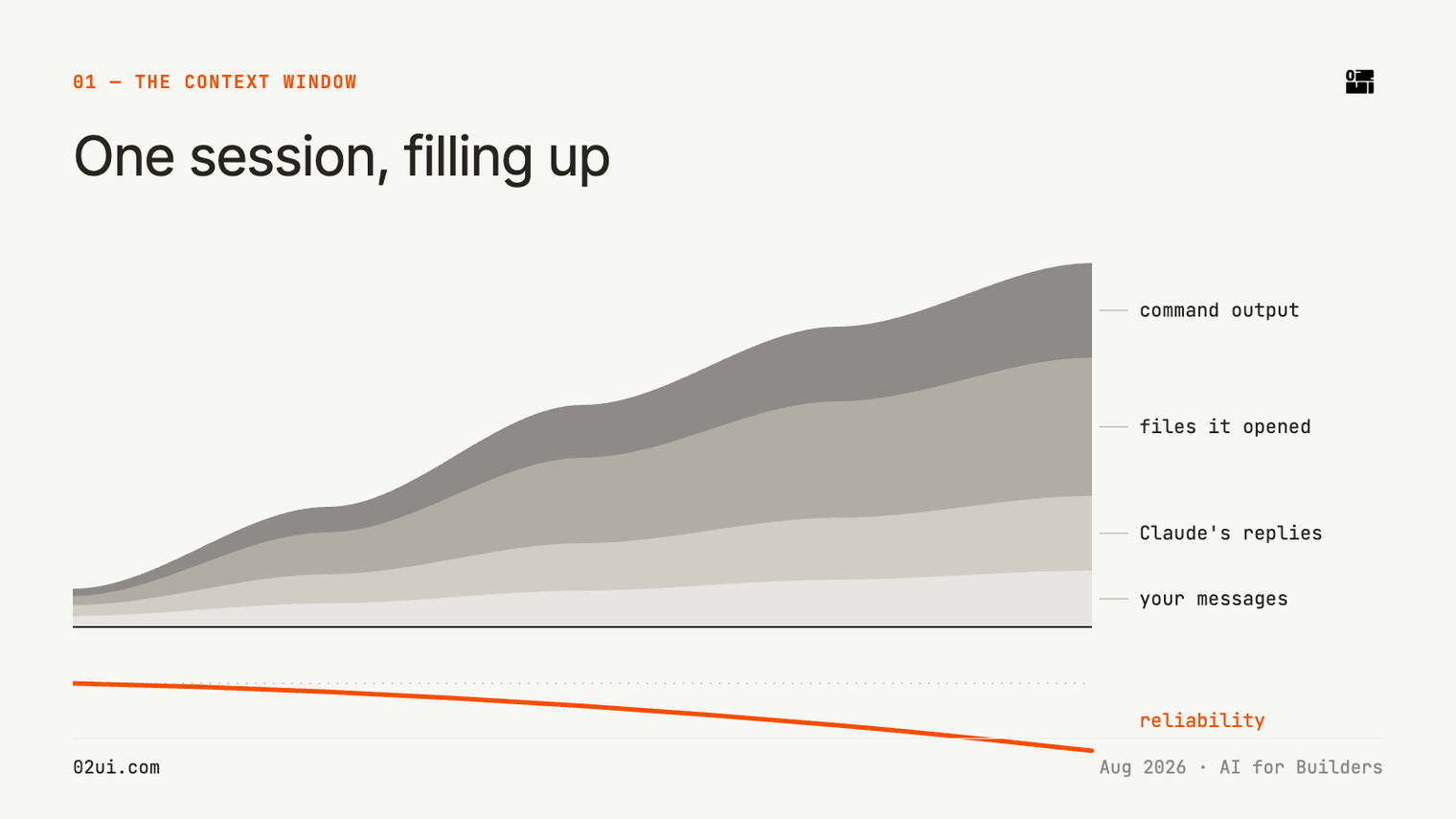
Claude Code holds one pile of text and works from it. Your messages, its replies, every file it opened, every command it ran and everything those commands printed back. That pile is the context window, and it only grows during a session.
Anthropic puts this at the top of their own best practices page, before any tips: "Most best practices are based on one constraint: Claude's context window fills up fast, and performance degrades as it fills."
That word "degrades" is doing a lot of work. The model does not hit a wall and stop. It gets quietly less reliable while sounding exactly as sure of itself as it did at the start. That is why the problem is easy to miss until you have wasted an afternoon on it.
If you are watching your usage rather than your output quality, the same thing shows up as cost. I wrote about that side of it in how to reduce Claude token usage.
What the research actually shows
Chroma published a technical report called Context Rot in July 2025. They tested 18 models, including Claude Sonnet 4, Claude Opus 4, GPT-4.1 and Gemini 2.5, and they designed the tests so that task difficulty stayed identical while only the input length changed. Performance dropped as the input grew, on tasks as simple as copying a piece of text back.
The result that matters most here comes from their conversation test. They took 306 questions and asked each one twice. Once inside a full chat history averaging around 113,000 tokens, and once with only the relevant few lines attached, averaging around 300 tokens. Same question, same answer sitting in the text both times. Every model family scored significantly higher on the short version.
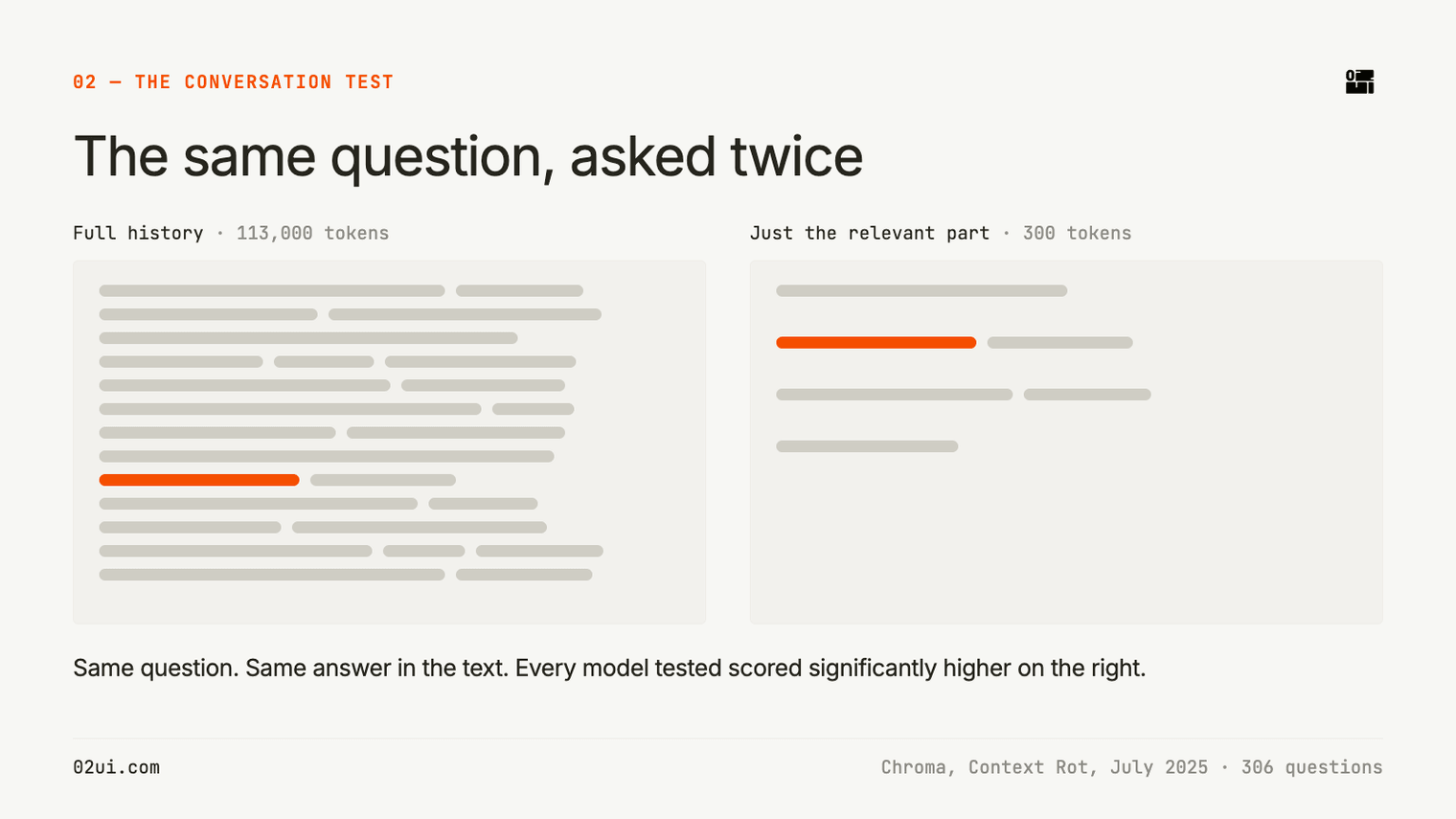
Turn that into a working instruction and it says something uncomfortable. How well the model uses a fact depends on how much unrelated material is sitting around it. Your session can contain the answer and still get it wrong.
There is an older finding worth knowing too. Nelson Liu and colleagues published "Lost in the Middle" in 2023, later in the TACL journal. They moved the answer around inside a long input and measured accuracy at each position. Accuracy was highest when the answer sat near the beginning or the end, and lowest when it sat in the middle. The decisions you made 40 minutes into a session are sitting right in that middle.
One correction to something I have said out loud, including on my own channel. I have called this hallucination. Chroma's numbers say that is the wrong word for what most Claude users are seeing. In their distractor tests, Claude models consistently had the lowest hallucination rates, and Sonnet 4 and Opus 4 in particular tend to abstain when they are uncertain, saying they cannot find the answer rather than inventing one. So what you notice in a long Claude Code session is usually drift: vagueness, forgetting, contradiction, questions it already had the answer to. Worth being accurate about, because it changes what you look for.
/clear and /compact, and what each one costs
Claude Code gives you two built-in commands, and each one takes something away.
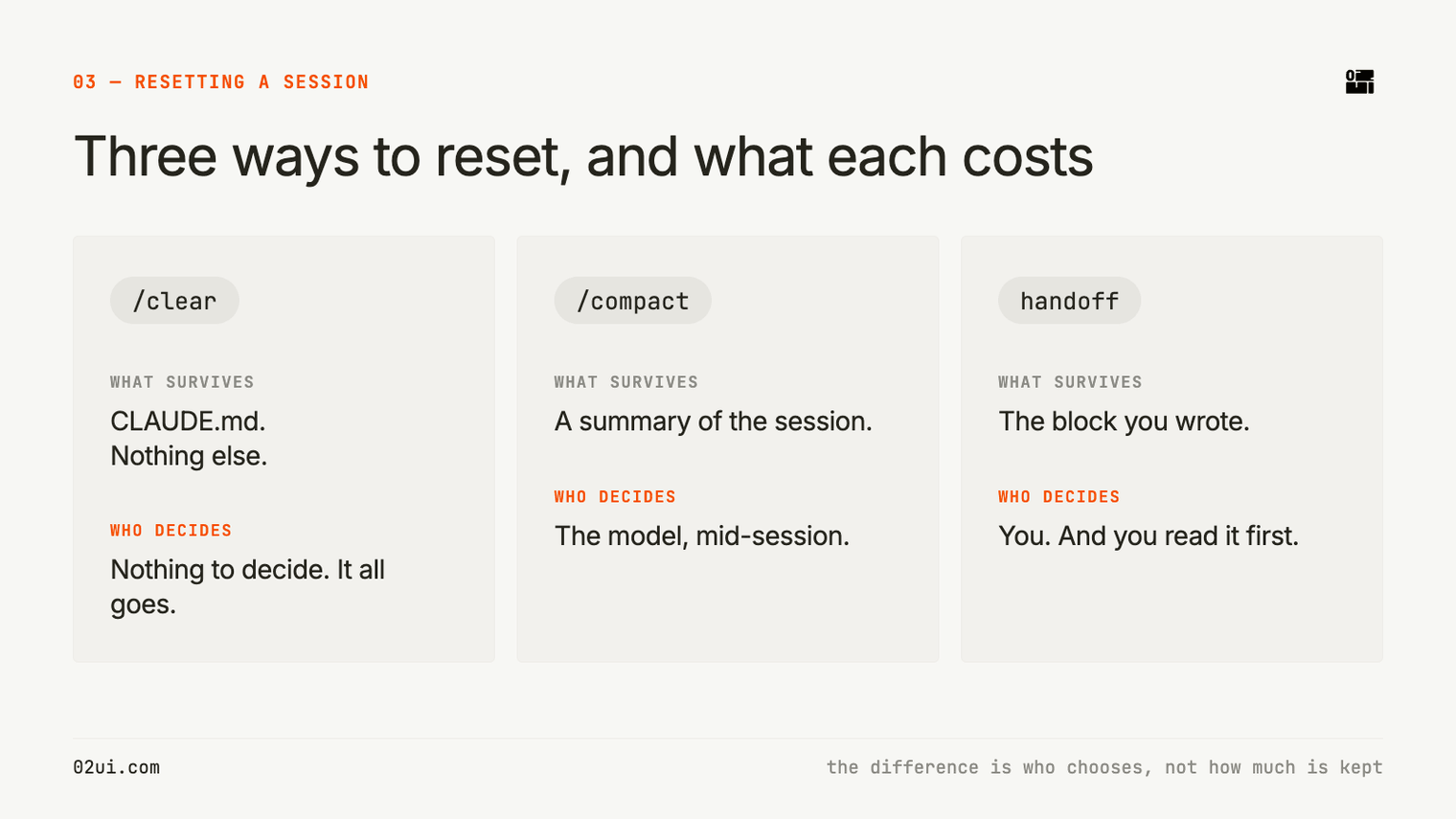
/clear wipes the conversation. Your CLAUDE.md still loads, and nothing else survives. Anthropic recommends it between unrelated tasks, and they give a specific trigger: if you have corrected Claude more than twice on the same issue, the context is now full of failed attempts, so clear it and start again with a better prompt.
/compact asks the model to summarise the session so far and keeps the summary in place of the full history. It is useful, and it has a catch. The summary is written by the model, in the same session that is already degrading, and you do not choose what survives. Summarisation is lossy by design.
Between those two sits a third option. You write the summary, you read it, and you decide what carries over.
What a handoff block carries
When you brief a freelancer, you do not forward them 6 weeks of Slack. You send one page: what we are making, what is agreed, what is still open, what to do first.
That is the whole idea. Before I close a session, I ask Claude to produce a handoff block. It comes back as one piece of text I can copy in a single click, structured into fixed sections:
- Working with. Who you are and how you want to be spoken to.
- Project. What we are making and who it is for.
- State. Where the work stands right now, facts only.
- Approach. How we agreed to work, including the review points.
- Decided. Each decision with its reason attached.
- Open. Questions still live, with the options on the table.
- Corrections. Anything Claude got wrong or you pushed back on.
- Next. The single first action.
- Files and links. Paths and names, enough for a new session to find things.
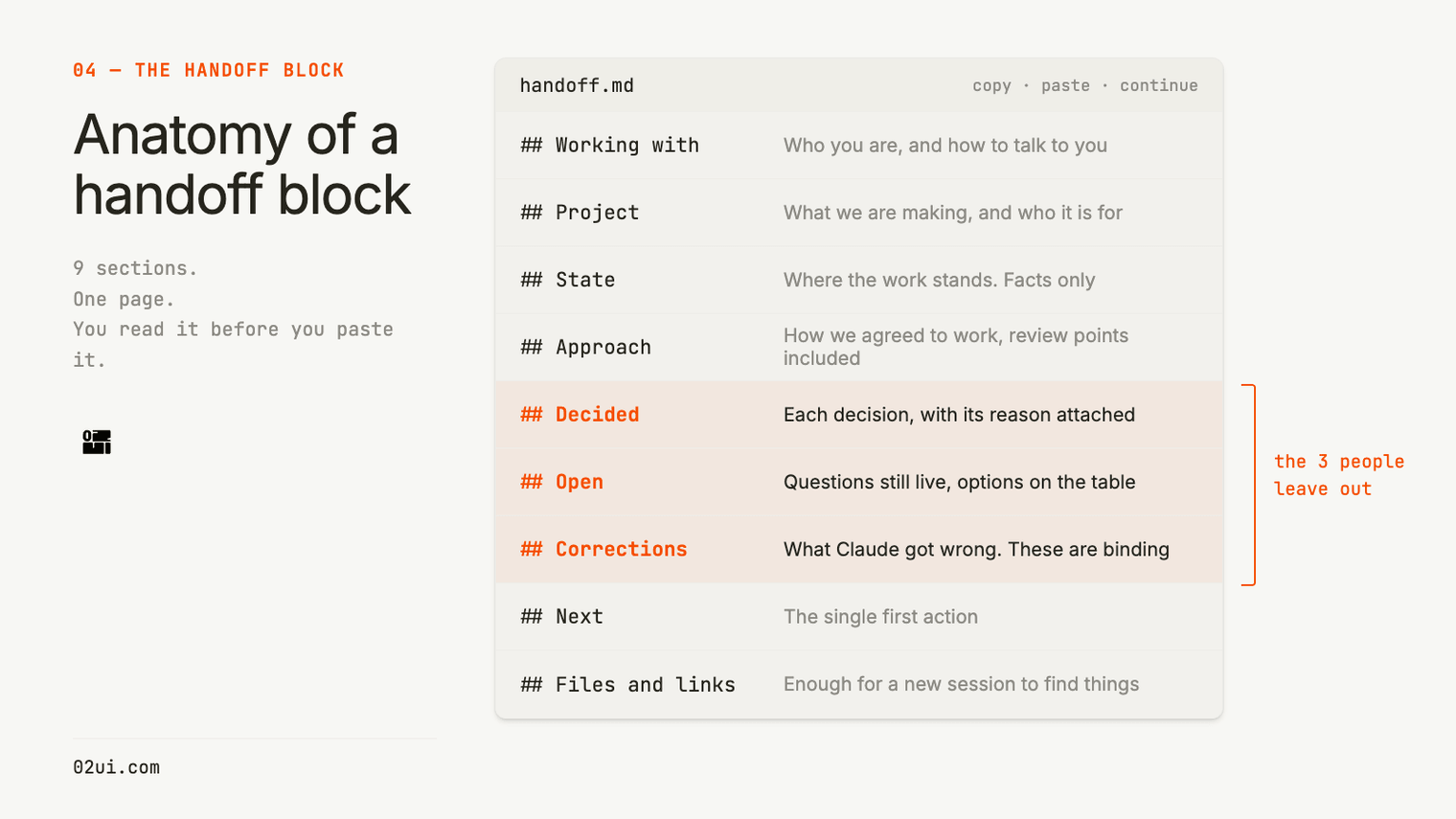
The three that people leave out are Decided, Open and Corrections, and they are the three that save the most time. Without Decided, the new session reopens a call you settled yesterday. Without Open, it quietly picks one option and builds on it. Without Corrections, you spend the first 10 minutes re-teaching preferences you already taught once.
There is a second reason this works, and it goes back to the research. A handoff block is a short focused input. You are giving the new session the 300-token version of the problem instead of the 113,000-token version.
Anthropic recommend the same shape of thing for larger features: write a spec, then open a fresh session to build from it. Their words: "The new session has clean context focused entirely on implementation."
The skill
This is our version. It is a Claude skill, which is a plain markdown file that sits in a folder and teaches Claude one job. Copy everything in the block below into a file called SKILL.md.
---
name: session-handoff
description: "Produce a copy-paste handoff block at the end of a session so the user can start a new session anywhere and carry straight on without re-explaining. Trigger on 'session-handoff', 'handoff', 'save this session', 'wrap this up', 'update the handoff', or any request to capture where a piece of work got to. Also trigger on the resume side when the user pastes a block starting with CONTINUE FROM HANDOFF, or says 'catch me up', 'pick up where we left off', 'continue from the handoff'. Use this even when the request sounds casual, like 'right, let us stop here' or 'where were we on this?'. Output is text only, never a file. Works in Claude Code, Claude desktop, and Cowork."
---

# Session handoff

Two jobs: produce a handoff block at the end of a session, and act on one when the user pastes it into a new session.

The block is text they copy and paste. Never write a file. Never save it to memory. Never offer to.

The receiving session may have nothing: no memory of the user, no stored preferences, no skills installed. Claude Code in a bare repo is the normal case. So the block carries everything the next session needs, including how to behave.

## Producing the block

Output the whole thing as one fenced markdown code block, so the copy button takes all of it in one go.

Put nothing before it except a single short line. Put nothing after it except one question: "Anything wrong or missing?"

Do not summarise the block back to them. They are about to read it.

If the session covered two unrelated projects, ask which one they want before writing. If they want both, produce two separate blocks.

### Template

Use this structure exactly. Drop a section only when it would be empty.

```
CONTINUE FROM HANDOFF

You are picking up a project mid-way. Read all of this before replying.
Then reply with 5 lines maximum: the goal, the last decision made, and the next step.
Then ask what has changed since. Do not restate this block back.
Everything under OPEN is still undecided. Do not pick one and run with it.
Everything under CORRECTIONS is binding.

## Working with
[EDIT THIS SECTION ONCE, THEN LEAVE IT ALONE]
Name. Role and where they are based.
What they are building, and any other business or context that matters.
Language and tone preferences.
Technical level: what they are expert in, and what they are not.
How to explain things, and what never to assume.
Any rules for written content produced in their voice.

## Project
What we are making and who it is for. One or two lines.

## State
Where the work stands right now. Facts only.

## Approach
How we agreed to work on it. The method, the order, the review points.

## Decided
Each line: the decision, then the reason in a few words.

## Open
Each line: the question, and the options currently on the table.

## Corrections
Anything Claude got wrong, or that the user pushed back on. These carry over permanently.

## Next
The single first action for the next session.

## Files and links
Names, paths, and where things live. Enough for a new session to find them.
```

The `Working with` section stays as written, every time. It is what makes the block work in a bare Claude Code session. The user fills it in once when they install the skill.

### Length

Aim for one screen. Roughly 500 words for the project sections, on top of the fixed header.

Leave out:

- Turn-by-turn recap of the conversation
- Full drafts. Name the file or paste location instead.
- Anything a fresh session could work out in 30 seconds
- How the session felt, or what went well

Keep, even when it seems small:

- Options the user rejected, with the reason. This stops the next session reopening a settled call.
- Exact numbers, names, dates, prices, deadlines, file paths
- Corrections. If they had to say "no, not like that" once, the next session should not need it again.
- The working method under `Approach`. Re-agreeing on process wastes as much time as re-explaining facts.

### Updating

If the user pastes an older block and the session moves things on, produce a fresh full block at the end. Rewrite changed lines in place. Do not stack the new decision under the old one.

If a thread was dropped on purpose, keep one line under `State` saying so, so it does not get picked back up.

## Receiving a block

When a message starts with CONTINUE FROM HANDOFF, follow the instructions inside it. In short:

1. Read all of it.
2. Reply in 5 lines maximum: goal, last decision, next step.
3. Ask what has changed since. Days may have passed and they may have moved things on outside the session.
4. Treat `Open` as open and `Corrections` as binding.
5. Apply the `Working with` section to everything from that point on.

Do not thank them for the context or comment on how useful it is. Start working.

## Why Corrections and Approach matter

Most of the repeating this skill exists to avoid is not project facts. It is re-teaching the same preferences, re-explaining rejected options, and re-agreeing how the work gets done. A block without those three things still costs a full re-brief.
Where the file goes
The file is SKILL.md. It goes in a folder named session-handoff.
For one project, put that folder in .claude/skills/ at the root of the project:
your-project/
  .claude/
    skills/
      session-handoff/
        SKILL.md
For every project on your machine, put it in ~/.claude/skills/ instead. On a Mac that is a hidden .claude folder inside your home folder. Press Cmd + Shift + Period in Finder to see hidden folders.
It works the same way in Claude Code, the Claude desktop app, and Cowork.
Customise it before you use it
This part is not optional, and it is the reason a stranger's skill usually feels wrong when you install it.
Open SKILL.md and find the block marked ## Working with. Right now it is a set of prompts rather than facts. Replace each line with your own: your name, what you do, how you like things explained, what you are expert in and what you are not, and any rules for writing in your voice.
Mine says I am professional level in Figma and have basic HTML and CSS only, so nothing ever gets explained to me in code I cannot read. Yours will say something different. Write it as if you are briefing a new freelancer who has never met you.
Fill it in once. That section then travels with every handoff you produce, which is what lets a completely blank session know how to talk to you from its first reply.
When to run it
Every 10 to 20 messages, depending on how complicated the work is. Simple work stretches further. Anything with a lot of file reading fills up faster than you expect.
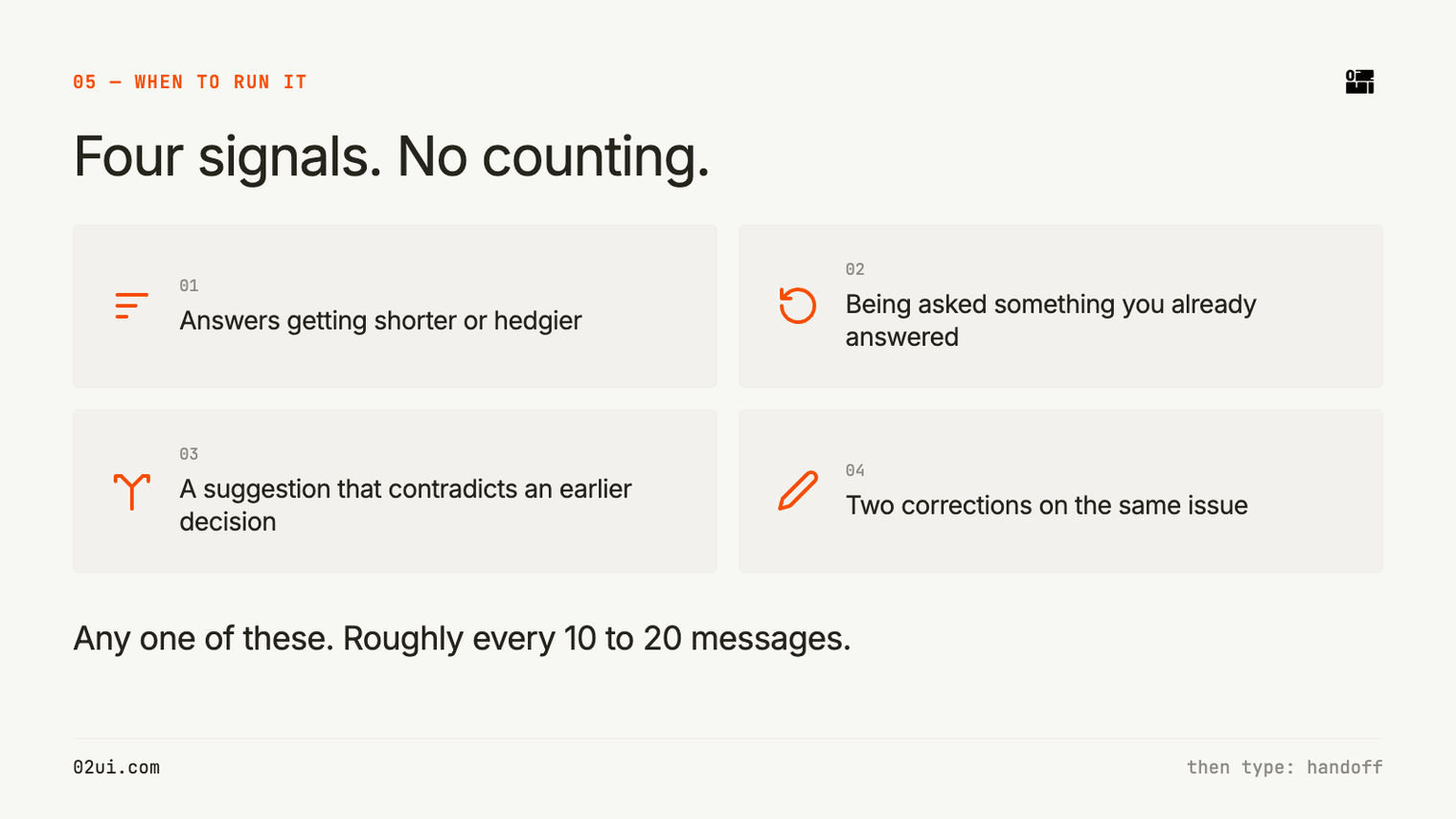
You do not need to count. The signals are easy to spot once you know them:
- Answers getting shorter or hedgier
- Being asked something you already answered
- A suggestion that contradicts a decision you made earlier
- Two corrections on the same issue, which is Anthropic's own threshold for starting over
Any one of those, type handoff.
Read it before you paste it
The first question people ask is why this is not automatic. If the model knows the session is degrading, why does it not hand over to itself?
I want the gap. The handoff block is the one moment in the whole process where you can see what the model thinks the project is, laid out in plain sentences. If a decision is recorded wrong there, it was already wrong in the session and you were about to build on it. Reading it takes about 20 seconds and it catches things nothing else catches.
Then you open a new session, paste it in, and carry on. The reply comes back with the goal, the last decision and the next step, and a question about what has changed since. No re-explaining.
One practical note. A mid-tier model with a clean session will usually beat a top-tier model carrying 3 hours of history. Input length is the lever you have most control over.
If you want the other half of this, a memory that persists across projects rather than within one, I wrote about that in second brain for Claude. And if your CLAUDE.md has quietly grown to 200 lines while you were not looking, that file is probably making your output worse.
Take the skill, change it, use it in client work. If you improve it, I would like to see what you changed.
The habit took me about a week to build. Now it feels like saving a file.
Sources
- Anthropic, Best practices for Claude Code, accessed August 2026
- Hong, K., Troynikov, A., Huber, J. (2025). Context Rot: How Increasing Input Tokens Impacts LLM Performance. Chroma Technical Report, 14 July 2025
- Liu, N. F., Lin, K., Hewitt, J., Paranjape, A., Bevilacqua, M., Petroni, F., Liang, P. (2023). Lost in the Middle: How Language Models Use Long Contexts. arXiv 2307.03172, published in TACL 2024