 Murat Bayral4m read
One prompt that turns your 12 milestones into an animated risograph print
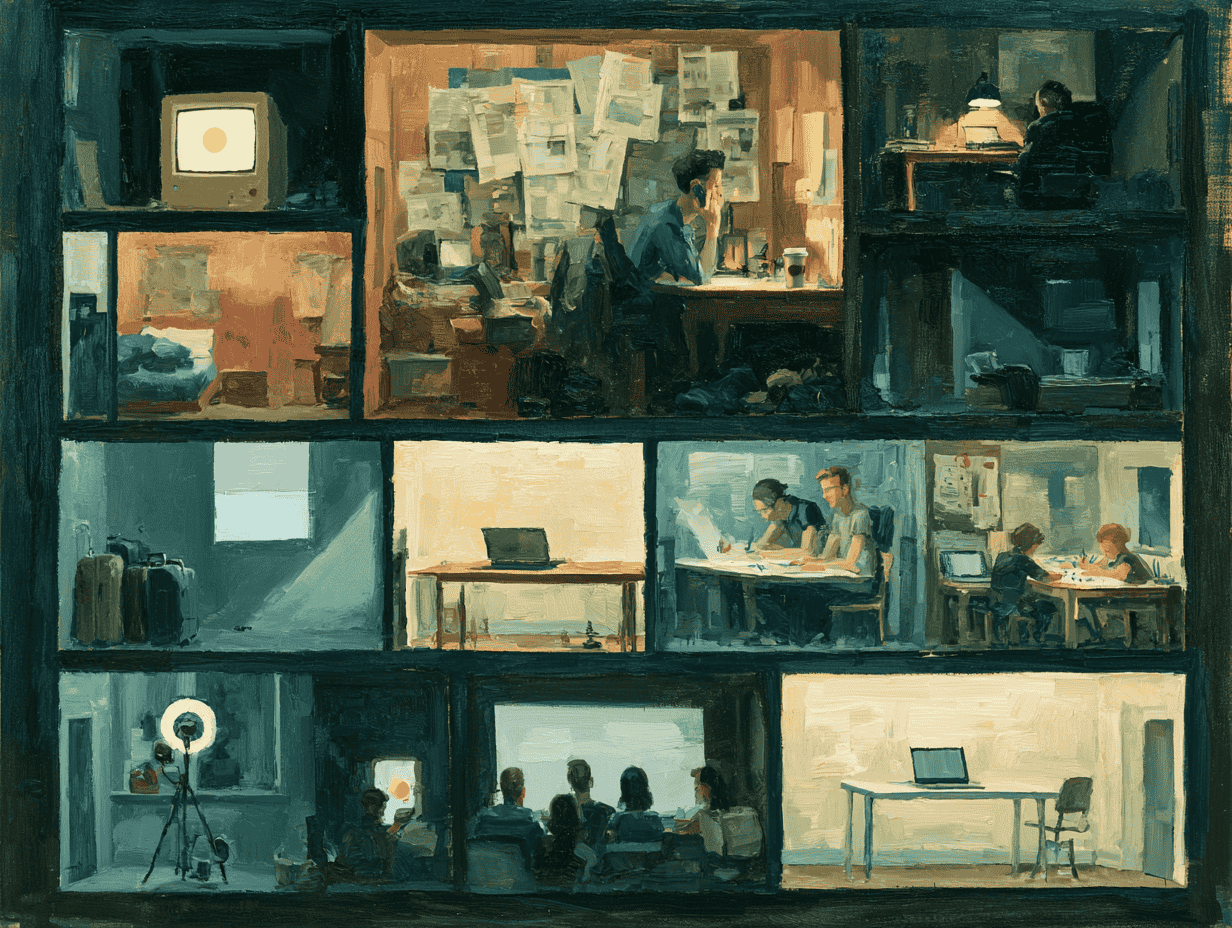
We saw a piece of work online: a whole sheet of tiny isometric rooms, printed like a risograph, and every single thing in it was drawn with code. No images. No image generator. Our first thought was simple: how do we make this?
So we took 12 milestones from a career and turned each one into a room. The rooms print in one by one, the lines wobble like hand drawing, the light from lamps and windows is made of ink dots, and small people move around inside. It is one HTML file, built with Claude Opus 5.5 in Claude Code.
The prompt below is everything we learned along the way, in one place. We took out every personal detail, so you fill in your own 12 moments.
What you get
- 12 isometric rooms on warm paper, each on its own floor slab, with space between them.
- A real risograph look: coarse ink dots in 8 spot colours, slight misregistration, and ink dropout.
- One orange dot in every room. It is "the idea", and it moves from room to room.
- Small animated people, a camera tour, and arrow keys to step from room to room.
- A caption card for each room, which you can switch off.
How to use it
- Open a coding agent that can write files and open a browser preview. We used Claude Code.
- Copy the prompt below.
- Fill in the table with your 12 milestones, and describe yourself in one line.
- Paste it, and let it work. This is a long job, so give it time.
The prompt
Build a single HTML file that shows 12 rooms from my life as one isometric risograph print, drawn entirely in code.

WHY: I want to tell my story in 12 milestones, one room each, and share it as a page people can explore. It must look like a real risograph print (coarse ink dots on warm paper), not a digital illustration. There is no image generation: every room, person, object, letter and ink dot is drawn with Canvas 2D code.

Work as a coding agent. Do not ask permission for reversible steps; just proceed. Build in this order, and check each step in a browser before you move on:
1. The print engine, with one test room.
2. People.
3. All 12 rooms.
4. Camera, tour and controls.
5. The caption card.

"""
MY 12 MILESTONES (one row per room)
| # | Year and place | Title (2-4 words) | Caption (1 sentence) | What the room shows | Where the "idea" dot is | People (max) |
| 1 | [e.g. Hometown, 2005] | [e.g. First pixels] | [e.g. An old laptop, a first design program, and one dot on the screen.] | [e.g. A teenage bedroom at night: desk, laptop, posters, a lamp, a bed] | [e.g. On the laptop screen] | [e.g. 1] |
| 2 | ... |
| 12 | ... |

ME IN THE SCENES: [e.g. tall and thin, curly dark hair, round glasses from room 6 onwards]
"""

THE FILE
- One self-contained .html file. No images, no libraries, no network requests. Canvas 2D only.
- Fonts: [Inter for text and a monospace font for labels], embedded as base64 @font-face so the file works offline. If you cannot embed them, use system-ui.
- All randomness is seeded, so the print is identical on every load.

THE SHEET
- Paper colour #f7f7f4 with a subtle paper grain (short fibres and flecks) fills the whole window. There is no dark surround and no sheet edge.
- Each room is 13 x 10 m on a 60 cm floor slab. There are two back walls, cut at 2.3 m, so you see inside.
- Lay the rooms on a 4 x 3 grid in a snake order, with 8 m of empty paper between rooms, so no room hides the one behind it.
- People are small: a 1.75 m person in a 13 m room. Rooms are wide and full of detail: furniture, shelves, plants, screens, rugs, windows with a view outside, and small objects that tell the story.

THE RISOGRAPH PRINT
- Use 8 spot inks: warm ink #26251d, blue #3d5588, mint #4fb3a2, pink #ee8497, yellow #f6c137, green #3d9a5c, grey #8c8b85, and one accent, orange #f54e00. The accent is used ONLY for "the idea": one small orange dot in every room, in the place my table names.
- Every shape has a material: a tone from 0 to 1 per ink. Leave off any ink that is under half the strongest tone and under 0.2, so most surfaces print in one or two clear inks.
- Screen each ink as a grid of round dots at its own angle (45, 15, 75, 30, 0, 60, 15, 30 degrees). Dot area equals the tone. Anchor the grid to the world, with only tiny position jitter.
- Dot spacing: about 4.5 CSS pixels at normal zoom (3.5 on phones). Dots grow only when you zoom in close (5 cm of world per dot).
- Multiply the inks onto the paper. Give each ink a small misregistration offset, and add gritty ink dropout in solid areas.
- Lines are tapered, slightly wobbly strokes in warm ink. They are at least 1.5 CSS pixels wide, so they stay visible next to the dots.
- The print "boils": make 3 versions with different line wobble and cycle them 3 times a second.
- Light is ink. Night is extra blue dots. Lamps and screens cut stepped round pools out of the dark. Windows cast stepped light patches on the floor. Screens and lamps ignore the dark. There are no gradients anywhere; use flat stepped bands.

PEOPLE
- One shared 3D skeleton, projected to isometric. Use tapered volumes for limbs, a 3D head (eyes, brows, nose, glasses and hair turn with it), and hair and clothes per person.
- Pose clips with easing: stand, walk, sit, type, sketch, point, present, look, phone call, hold a phone, sleep at the desk, and more as the rooms need them.
- People who move follow looped scripts along paths that do not cross furniture. Re-print them 8 times a second. People who do not move are printed into the room.

PERFORMANCE
- Print each room once as a whole image for the overview, in small steps inside each frame. Print nothing while the camera moves.
- Closer in, print 512 px tiles only where you are looking. Print the room in view first, and print the rooms either side ahead of time. Only the room in focus boils. Cap the tile count and drop old tiles.
- Guard against a zero-size window and invalid camera values.

CAMERA AND CONTROLS
- On load, the rooms print in one by one on the overview. Then a tour flies to each room with a smooth zoom and pan (the van Wijk method), holds, and moves on. Before it flies, the tour waits until the next room has finished printing.
- Right arrow: next room (after room 12, the overview). Left arrow: go back. Esc: overview.
- Drag to pan with inertia, scroll or pinch to zoom at the cursor, double-click a room to fly to it.
- Any input pauses the tour. The tour starts again after 60 seconds without input.
- Put a small pill-shaped bar at the top right with previous and next buttons, a counter ("03 / 12" or "Overview"), and a Captions on/off switch. The C key also switches captions.

CAPTION CARD (bottom left, full width on phones)
- A paper-coloured panel with 12 px corners and a soft shadow.
- First line: small monospace uppercase label, "03 · YEAR AND PLACE".
- Title: 22 px, regular weight, tight letter spacing.
- Caption: 18 px, regular weight.
- No italics, no quotation marks, no big first letter.

WHEN YOU FINISH
Lead with the outcome: the file path and whether it opens without console errors. Then list anything you could not check. Add a short README with the room table and the controls.
If something looks wrong
Send one short fix at a time. Do not rewrite the whole prompt. These are the fixes we needed ourselves:
- "The people are too big. Make everyone smaller and give the rooms more space."
- "The dots look like flat colour. Make them clear, separate dots."
- "The dots are too big. Make them much smaller."
- "Room 4 needs more detail: more objects, more colour."
- "The titles are too big. Make them half the size."
It works best in a coding agent that can see its own result in a browser. In a normal chat window, it will run out of room before it finishes.